project demo
introduction
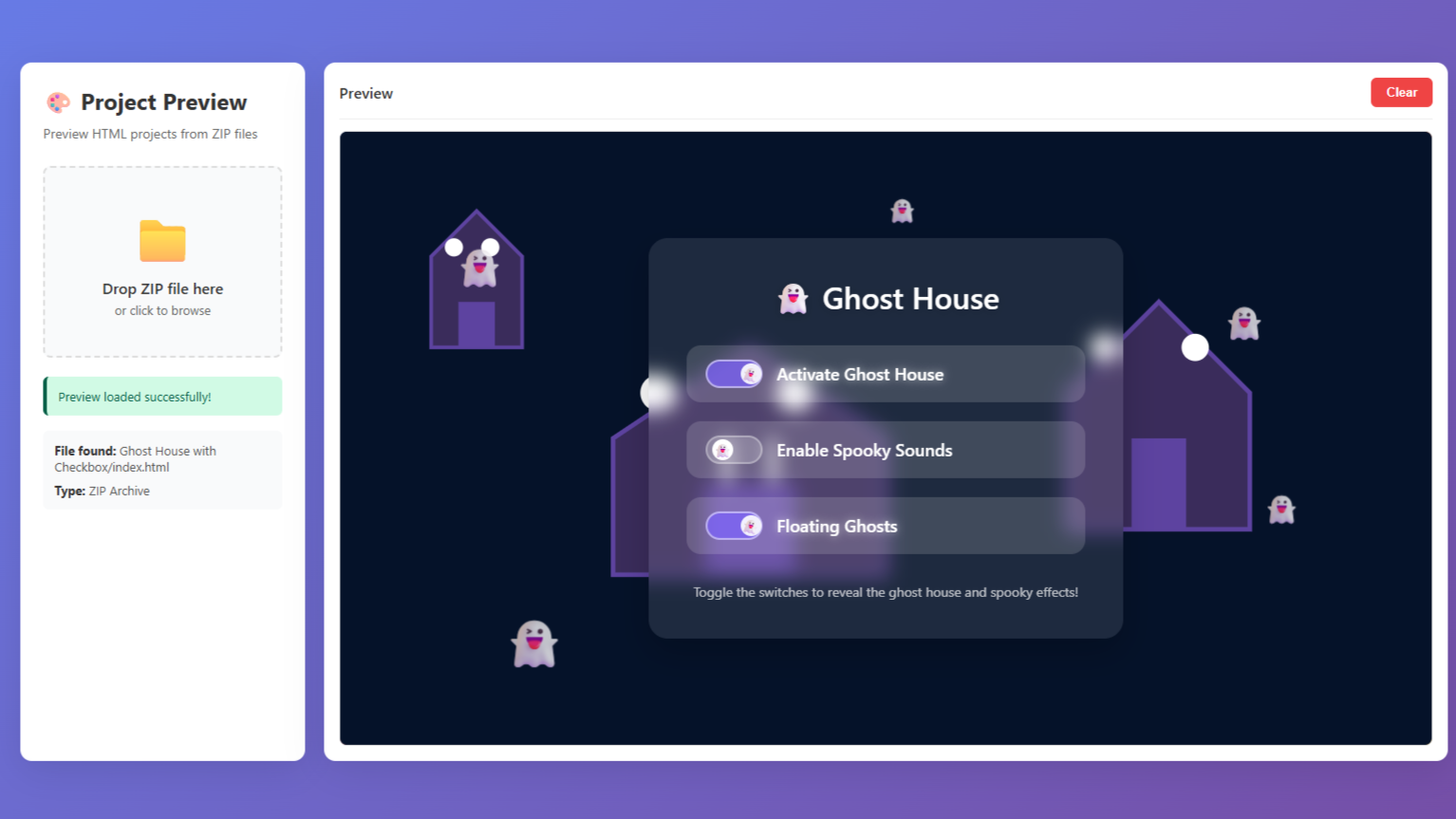
This project is basically a simple tool I made to preview any HTML project directly from a ZIP file without extracting it. I wanted something quick and clean where I could just drop a ZIP and instantly see the website running. It helps a lot when testing small front-end projects or checking someone’s code before opening it properly. Everything opens inside an iframe, and all files load automatically with correct paths. It’s just a neat way to save time and avoid the usual hassle of manual unzipping.
Source Code: Scroll down to download zip file 👇
html code
Inside the body tag, we used a main container that splits the layout into a sidebar and a preview panel. The sidebar holds the upload section with a drag-and-drop zone, file input, status messages, and file info display. The preview panel contains a header with a clear button and an iframe where the selected project is shown. Structural elements like divs organize everything neatly into sections. Interactive elements like buttons, icons, and text containers help manage uploading, clearing, and viewing the ZIP preview.
					<!DOCTYPE html>
<html lang="en">

<head>
  <meta charset="UTF-8">
  <meta name="viewport" content="width=device-width, initial-scale=1.0">
  <title>Project Preview - ZIP</title>


</head>

<body>
  <div class="container">

    <div class="sidebar">
      <h1>🎨 Project Preview</h1>
      <p class="subtitle">Preview HTML projects from ZIP files</p>


      <div class="upload-zone" id="uploadZone">
        <div class="upload-icon">📁</div>
        <div class="upload-text">Drop ZIP file here</div>
        <div class="upload-hint">or click to browse</div>
        <input type="file" id="fileInput" accept=".zip">
      </div>


      <div class="status" id="status"></div>


      <div class="info-box">
        <div><strong>File found:</strong> <span id="foundFile">—</span></div>
        <div style="margin-top: 8px;"><strong>Type:</strong> <span id="projectType">—</span></div>
      </div>
    </div>


    <div class="preview-panel">
      <div class="preview-header">
        <div class="preview-title">Preview</div>
        <button class="clear-btn" id="clearBtn">Clear</button>
      </div>
      <div class="iframe-container">
        <iframe id="preview" sandbox="allow-scripts allow-same-origin allow-forms allow-popups"></iframe>
      </div>
    </div>
  </div> <script data-no-optimize="1">window.lazyLoadOptions=Object.assign({},{threshold:300},window.lazyLoadOptions||{});!function(t,e){"object"==typeof exports&&"undefined"!=typeof module?module.exports=e():"function"==typeof define&&define.amd?define(e):(t="undefined"!=typeof globalThis?globalThis:t||self).LazyLoad=e()}(this,function(){"use strict";function e(){return(e=Object.assign||function(t){for(var e=1;e<arguments.length;e++){var n,a=arguments[e];for(n in a)Object.prototype.hasOwnProperty.call(a,n)&&(t[n]=a[n])}return t}).apply(this,arguments)}function o(t){return e({},at,t)}function l(t,e){return t.getAttribute(gt+e)}function c(t){return l(t,vt)}function s(t,e){return function(t,e,n){e=gt+e;null!==n?t.setAttribute(e,n):t.removeAttribute(e)}(t,vt,e)}function i(t){return s(t,null),0}function r(t){return null===c(t)}function u(t){return c(t)===_t}function d(t,e,n,a){t&&(void 0===a?void 0===n?t(e):t(e,n):t(e,n,a))}function f(t,e){et?t.classList.add(e):t.className+=(t.className?" ":"")+e}function _(t,e){et?t.classList.remove(e):t.className=t.className.replace(new RegExp("(^|\\s+)"+e+"(\\s+|$)")," ").replace(/^\s+/,"").replace(/\s+$/,"")}function g(t){return t.llTempImage}function v(t,e){!e||(e=e._observer)&&e.unobserve(t)}function b(t,e){t&&(t.loadingCount+=e)}function p(t,e){t&&(t.toLoadCount=e)}function n(t){for(var e,n=[],a=0;e=t.children[a];a+=1)"SOURCE"===e.tagName&&n.push(e);return n}function h(t,e){(t=t.parentNode)&&"PICTURE"===t.tagName&&n(t).forEach(e)}function a(t,e){n(t).forEach(e)}function m(t){return!!t[lt]}function E(t){return t[lt]}function I(t){return delete t[lt]}function y(e,t){var n;m(e)||(n={},t.forEach(function(t){n[t]=e.getAttribute(t)}),e[lt]=n)}function L(a,t){var o;m(a)&&(o=E(a),t.forEach(function(t){var e,n;e=a,(t=o[n=t])?e.setAttribute(n,t):e.removeAttribute(n)}))}function k(t,e,n){f(t,e.class_loading),s(t,st),n&&(b(n,1),d(e.callback_loading,t,n))}function A(t,e,n){n&&t.setAttribute(e,n)}function O(t,e){A(t,rt,l(t,e.data_sizes)),A(t,it,l(t,e.data_srcset)),A(t,ot,l(t,e.data_src))}function w(t,e,n){var a=l(t,e.data_bg_multi),o=l(t,e.data_bg_multi_hidpi);(a=nt&&o?o:a)&&(t.style.backgroundImage=a,n=n,f(t=t,(e=e).class_applied),s(t,dt),n&&(e.unobserve_completed&&v(t,e),d(e.callback_applied,t,n)))}function x(t,e){!e||0<e.loadingCount||0<e.toLoadCount||d(t.callback_finish,e)}function M(t,e,n){t.addEventListener(e,n),t.llEvLisnrs[e]=n}function N(t){return!!t.llEvLisnrs}function z(t){if(N(t)){var e,n,a=t.llEvLisnrs;for(e in a){var o=a[e];n=e,o=o,t.removeEventListener(n,o)}delete t.llEvLisnrs}}function C(t,e,n){var a;delete t.llTempImage,b(n,-1),(a=n)&&--a.toLoadCount,_(t,e.class_loading),e.unobserve_completed&&v(t,n)}function R(i,r,c){var l=g(i)||i;N(l)||function(t,e,n){N(t)||(t.llEvLisnrs={});var a="VIDEO"===t.tagName?"loadeddata":"load";M(t,a,e),M(t,"error",n)}(l,function(t){var e,n,a,o;n=r,a=c,o=u(e=i),C(e,n,a),f(e,n.class_loaded),s(e,ut),d(n.callback_loaded,e,a),o||x(n,a),z(l)},function(t){var e,n,a,o;n=r,a=c,o=u(e=i),C(e,n,a),f(e,n.class_error),s(e,ft),d(n.callback_error,e,a),o||x(n,a),z(l)})}function T(t,e,n){var a,o,i,r,c;t.llTempImage=document.createElement("IMG"),R(t,e,n),m(c=t)||(c[lt]={backgroundImage:c.style.backgroundImage}),i=n,r=l(a=t,(o=e).data_bg),c=l(a,o.data_bg_hidpi),(r=nt&&c?c:r)&&(a.style.backgroundImage='url("'.concat(r,'")'),g(a).setAttribute(ot,r),k(a,o,i)),w(t,e,n)}function G(t,e,n){var a;R(t,e,n),a=e,e=n,(t=Et[(n=t).tagName])&&(t(n,a),k(n,a,e))}function D(t,e,n){var a;a=t,(-1<It.indexOf(a.tagName)?G:T)(t,e,n)}function S(t,e,n){var a;t.setAttribute("loading","lazy"),R(t,e,n),a=e,(e=Et[(n=t).tagName])&&e(n,a),s(t,_t)}function V(t){t.removeAttribute(ot),t.removeAttribute(it),t.removeAttribute(rt)}function j(t){h(t,function(t){L(t,mt)}),L(t,mt)}function F(t){var e;(e=yt[t.tagName])?e(t):m(e=t)&&(t=E(e),e.style.backgroundImage=t.backgroundImage)}function P(t,e){var n;F(t),n=e,r(e=t)||u(e)||(_(e,n.class_entered),_(e,n.class_exited),_(e,n.class_applied),_(e,n.class_loading),_(e,n.class_loaded),_(e,n.class_error)),i(t),I(t)}function U(t,e,n,a){var o;n.cancel_on_exit&&(c(t)!==st||"IMG"===t.tagName&&(z(t),h(o=t,function(t){V(t)}),V(o),j(t),_(t,n.class_loading),b(a,-1),i(t),d(n.callback_cancel,t,e,a)))}function $(t,e,n,a){var o,i,r=(i=t,0<=bt.indexOf(c(i)));s(t,"entered"),f(t,n.class_entered),_(t,n.class_exited),o=t,i=a,n.unobserve_entered&&v(o,i),d(n.callback_enter,t,e,a),r||D(t,n,a)}function q(t){return t.use_native&&"loading"in HTMLImageElement.prototype}function H(t,o,i){t.forEach(function(t){return(a=t).isIntersecting||0<a.intersectionRatio?$(t.target,t,o,i):(e=t.target,n=t,a=o,t=i,void(r(e)||(f(e,a.class_exited),U(e,n,a,t),d(a.callback_exit,e,n,t))));var e,n,a})}function B(e,n){var t;tt&&!q(e)&&(n._observer=new IntersectionObserver(function(t){H(t,e,n)},{root:(t=e).container===document?null:t.container,rootMargin:t.thresholds||t.threshold+"px"}))}function J(t){return Array.prototype.slice.call(t)}function K(t){return t.container.querySelectorAll(t.elements_selector)}function Q(t){return c(t)===ft}function W(t,e){return e=t||K(e),J(e).filter(r)}function X(e,t){var n;(n=K(e),J(n).filter(Q)).forEach(function(t){_(t,e.class_error),i(t)}),t.update()}function t(t,e){var n,a,t=o(t);this._settings=t,this.loadingCount=0,B(t,this),n=t,a=this,Y&&window.addEventListener("online",function(){X(n,a)}),this.update(e)}var Y="undefined"!=typeof window,Z=Y&&!("onscroll"in window)||"undefined"!=typeof navigator&&/(gle|ing|ro)bot|crawl|spider/i.test(navigator.userAgent),tt=Y&&"IntersectionObserver"in window,et=Y&&"classList"in document.createElement("p"),nt=Y&&1<window.devicePixelRatio,at={elements_selector:".lazy",container:Z||Y?document:null,threshold:300,thresholds:null,data_src:"src",data_srcset:"srcset",data_sizes:"sizes",data_bg:"bg",data_bg_hidpi:"bg-hidpi",data_bg_multi:"bg-multi",data_bg_multi_hidpi:"bg-multi-hidpi",data_poster:"poster",class_applied:"applied",class_loading:"litespeed-loading",class_loaded:"litespeed-loaded",class_error:"error",class_entered:"entered",class_exited:"exited",unobserve_completed:!0,unobserve_entered:!1,cancel_on_exit:!0,callback_enter:null,callback_exit:null,callback_applied:null,callback_loading:null,callback_loaded:null,callback_error:null,callback_finish:null,callback_cancel:null,use_native:!1},ot="src",it="srcset",rt="sizes",ct="poster",lt="llOriginalAttrs",st="loading",ut="loaded",dt="applied",ft="error",_t="native",gt="data-",vt="ll-status",bt=[st,ut,dt,ft],pt=[ot],ht=[ot,ct],mt=[ot,it,rt],Et={IMG:function(t,e){h(t,function(t){y(t,mt),O(t,e)}),y(t,mt),O(t,e)},IFRAME:function(t,e){y(t,pt),A(t,ot,l(t,e.data_src))},VIDEO:function(t,e){a(t,function(t){y(t,pt),A(t,ot,l(t,e.data_src))}),y(t,ht),A(t,ct,l(t,e.data_poster)),A(t,ot,l(t,e.data_src)),t.load()}},It=["IMG","IFRAME","VIDEO"],yt={IMG:j,IFRAME:function(t){L(t,pt)},VIDEO:function(t){a(t,function(t){L(t,pt)}),L(t,ht),t.load()}},Lt=["IMG","IFRAME","VIDEO"];return t.prototype={update:function(t){var e,n,a,o=this._settings,i=W(t,o);{if(p(this,i.length),!Z&&tt)return q(o)?(e=o,n=this,i.forEach(function(t){-1!==Lt.indexOf(t.tagName)&&S(t,e,n)}),void p(n,0)):(t=this._observer,o=i,t.disconnect(),a=t,void o.forEach(function(t){a.observe(t)}));this.loadAll(i)}},destroy:function(){this._observer&&this._observer.disconnect(),K(this._settings).forEach(function(t){I(t)}),delete this._observer,delete this._settings,delete this.loadingCount,delete this.toLoadCount},loadAll:function(t){var e=this,n=this._settings;W(t,n).forEach(function(t){v(t,e),D(t,n,e)})},restoreAll:function(){var e=this._settings;K(e).forEach(function(t){P(t,e)})}},t.load=function(t,e){e=o(e);D(t,e)},t.resetStatus=function(t){i(t)},t}),function(t,e){"use strict";function n(){e.body.classList.add("litespeed_lazyloaded")}function a(){console.log("[LiteSpeed] Start Lazy Load"),o=new LazyLoad(Object.assign({},t.lazyLoadOptions||{},{elements_selector:"[data-lazyloaded]",callback_finish:n})),i=function(){o.update()},t.MutationObserver&&new MutationObserver(i).observe(e.documentElement,{childList:!0,subtree:!0,attributes:!0})}var o,i;t.addEventListener?t.addEventListener("load",a,!1):t.attachEvent("onload",a)}(window,document);</script><script data-no-optimize="1">window.litespeed_ui_events=window.litespeed_ui_events||["mouseover","click","keydown","wheel","touchmove","touchstart"];var urlCreator=window.URL||window.webkitURL;function litespeed_load_delayed_js_force(){console.log("[LiteSpeed] Start Load JS Delayed"),litespeed_ui_events.forEach(e=>{window.removeEventListener(e,litespeed_load_delayed_js_force,{passive:!0})}),document.querySelectorAll("iframe[data-litespeed-src]").forEach(e=>{e.setAttribute("src",e.getAttribute("data-litespeed-src"))}),"loading"==document.readyState?window.addEventListener("DOMContentLoaded",litespeed_load_delayed_js):litespeed_load_delayed_js()}litespeed_ui_events.forEach(e=>{window.addEventListener(e,litespeed_load_delayed_js_force,{passive:!0})});async function litespeed_load_delayed_js(){let t=[];for(var d in document.querySelectorAll('script[type="litespeed/javascript"]').forEach(e=>{t.push(e)}),t)await new Promise(e=>litespeed_load_one(t[d],e));document.dispatchEvent(new Event("DOMContentLiteSpeedLoaded")),window.dispatchEvent(new Event("DOMContentLiteSpeedLoaded"))}function litespeed_load_one(t,e){console.log("[LiteSpeed] Load ",t);var d=document.createElement("script");d.addEventListener("load",e),d.addEventListener("error",e),t.getAttributeNames().forEach(e=>{"type"!=e&&d.setAttribute("data-src"==e?"src":e,t.getAttribute(e))});let a=!(d.type="text/javascript");!d.src&&t.textContent&&(d.src=litespeed_inline2src(t.textContent),a=!0),t.after(d),t.remove(),a&&e()}function litespeed_inline2src(t){try{var d=urlCreator.createObjectURL(new Blob([t.replace(/^(?:<!--)?(.*?)(?:-->)?$/gm,"$1")],{type:"text/javascript"}))}catch(e){d="data:text/javascript;base64,"+btoa(t.replace(/^(?:<!--)?(.*?)(?:-->)?$/gm,"$1"))}return d}</script><script data-no-optimize="1">var litespeed_vary=document.cookie.replace(/(?:(?:^|.*;\s*)_lscache_vary\s*\=\s*([^;]*).*$)|^.*$/,"");litespeed_vary||fetch("/wp-content/plugins/litespeed-cache/guest.vary.php",{method:"POST",cache:"no-cache",redirect:"follow"}).then(e=>e.json()).then(e=>{console.log(e),e.hasOwnProperty("reload")&&"yes"==e.reload&&(sessionStorage.setItem("litespeed_docref",document.referrer),window.location.reload(!0))});</script><script data-optimized="1" type="litespeed/javascript" data-src="https://darkcssweb.com/wp-content/litespeed/js/9c97c8f7d04bc487f15dc720c9d57838.js?ver=43499"></script></body>

</html>
css code
We used a full reset to remove default browser spacing and make everything consistent. The layout uses a grid system for the container and flexbox for centering, aligning, and structuring elements cleanly. There are styled components like the sidebar, preview panel, upload zone, and buttons, each with shadows, gradients, or hover effects. We added responsive rules so the layout adjusts on smaller screens. Extra styling handles states like drag-over, status messages, and iframe presentation to keep everything polished.
					 /* Reset default styles */
 * {
     margin: 0;
     padding: 0;
     box-sizing: border-box;
 }

 /* Main body - centered with gradient background */
 body {
     display: flex;
     justify-content: center;
     align-items: center;
     font-family: -apple-system, BlinkMacSystemFont, 'Segoe UI', Roboto, Oxygen, Ubuntu, sans-serif;
     background: linear-gradient(135deg, #667eea 0%, #764ba2 100%);
     padding: 20px;
     min-height: 100vh;
 }

 /* Main container - 2 column layout (sidebar + preview) */
 .container {
     width: 80%;
     margin: 0 auto;
     display: grid;
     grid-template-columns: 300px 1fr;
     gap: 20px;
     height: 100%;
     transform-origin: top center;
 }

 /* Left sidebar - file upload and info */
 .sidebar {
     background: white;
     border-radius: 12px;
     padding: 24px;
     box-shadow: 0 10px 40px rgba(0, 0, 0, 0.1);
     overflow-y: auto;
 }

 /* Title styling */
 h1 {
     font-size: 24px;
     margin-bottom: 8px;
     color: #333;
 }

 /* Subtitle styling */
 .subtitle {
     color: #666;
     font-size: 14px;
     margin-bottom: 24px;
     line-height: 1.5;
 }

 /* Upload zone - drop area for ZIP files */
 .upload-zone {
     border: 2px dashed #ddd;
     border-radius: 8px;
     padding: 40px 20px;
     text-align: center;
     cursor: pointer;
     transition: all 0.3s;
     margin-bottom: 20px;
     background: #f9fafb;
 }

 /* Hover and drag-over states */
 .upload-zone:hover,
 .upload-zone.dragover {
     border-color: #667eea;
     background: #f0f4ff;
 }

 .upload-zone.dragover {
     transform: scale(1.02);
 }

 /* Upload icon styling */
 .upload-icon {
     font-size: 48px;
     margin-bottom: 12px;
 }

 /* Upload text styling */
 .upload-text {
     font-weight: 600;
     color: #333;
     margin-bottom: 4px;
 }

 /* Upload hint text */
 .upload-hint {
     font-size: 13px;
     color: #666;
 }

 /* Hidden file input */
 input[type="file"] {
     display: none;
 }

 /* Button styling */
 button {
     width: 100%;
     padding: 12px;
     background: linear-gradient(135deg, #667eea 0%, #764ba2 100%);
     color: white;
     border: none;
     border-radius: 6px;
     font-size: 14px;
     font-weight: 600;
     cursor: pointer;
     transition: transform 0.2s;
 }

 button:hover {
     transform: translateY(-2px);
 }

 button:active {
     transform: translateY(0);
 }

 /* Status message container */
 .status {
     padding: 12px;
     border-radius: 6px;
     margin-bottom: 16px;
     font-size: 13px;
     display: none;
 }

 .status.info {
     background: #e0f2fe;
     color: #0369a1;
     border-left: 4px solid #0369a1;
 }

 .status.error {
     background: #fee;
     color: #c00;
     border-left: 4px solid #c00;
 }

 .status.success {
     background: #d1fae5;
     color: #065f46;
     border-left: 4px solid #065f46;
 }

 .info-box {
     background: #f9fafb;
     padding: 12px;
     border-radius: 6px;
     font-size: 13px;
     color: #555;
     margin-top: 16px;
 }

 .info-box strong {
     color: #333;
 }

 .preview-panel {
     width: 100%;
     background: white;
     border-radius: 12px;
     padding: 16px;
     box-shadow: 0 10px 40px rgba(0, 0, 0, 0.1);
     display: flex;
     flex-direction: column;
 }

 .preview-header {
     display: flex;
     justify-content: space-between;
     align-items: center;
     margin-bottom: 12px;
     padding-bottom: 12px;
     border-bottom: 1px solid #eee;
 }

 .preview-title {
     font-weight: 600;
     color: #333;
 }

 .clear-btn {
     width: auto;
     padding: 8px 16px;
     background: #ef4444;
     font-size: 13px;
 }

 .iframe-container {
     flex: 1;
     border: 1px solid #ddd;
     border-radius: 8px;
     overflow: hidden;
     background: white;
     aspect-ratio: 16 / 9;
 }

 iframe {
     width: 100%;
     height: 100%;
     border: none;
 }

 @media (max-width: 1024px) {
     .container {
         grid-template-columns: 1fr;
         height: auto;
     }

     .preview-panel {
         min-height: auto;
     }

     .iframe-container {
         aspect-ratio: 16 / 9;
     }
 }
javascript code
The JavaScript handles selecting and processing the ZIP file using JSZip, then extracting all files inside it. It finds the main HTML file, rewrites resource paths, and creates blob URLs so everything loads properly in the iframe. It updates the UI with status messages, file details, and clears everything when needed. Event listeners manage drag-and-drop, file input changes, and the clear button. It also handles cleanup by revoking blob URLs to avoid memory leaks.
					// DOM element references
const uploadZone = document.getElementById("uploadZone");
const fileInput = document.getElementById("fileInput");
const clearBtn = document.getElementById("clearBtn");
const status = document.getElementById("status");
const foundFile = document.getElementById("foundFile");
const projectType = document.getElementById("projectType");
const preview = document.getElementById("preview");

// Store blob URLs for cleanup
let blobUrls = [];

// Display status message
function showStatus(message, type = "info") {
  status.textContent = message;
  status.className = `status ${type}`;
  status.style.display = "block";
  console.log(`[${type.toUpperCase()}]`, message);
}

// Hide status message
function hideStatus() {
  status.style.display = "none";
}

// Cleanup blob URLs to free memory
function revokeBlobUrls() {
  blobUrls.forEach((url) => URL.revokeObjectURL(url));
  blobUrls = [];
}

// Upload zone click to open file browser
uploadZone.addEventListener("click", () => fileInput.click());

// Drag over upload zone
uploadZone.addEventListener("dragover", (e) => {
  e.preventDefault();
  uploadZone.classList.add("dragover");
});

// Drag leave upload zone
uploadZone.addEventListener("dragleave", () => {
  uploadZone.classList.remove("dragover");
});

// Drop file on zone
uploadZone.addEventListener("drop", (e) => {
  e.preventDefault();
  uploadZone.classList.remove("dragover");
  const file = e.dataTransfer.files[0];
  if (file) handleZipFile(file);
});

// File input change event
fileInput.addEventListener("change", (e) => {
  const file = e.target.files[0];
  if (file) handleZipFile(file);
});

// Clear button to reset preview
clearBtn.addEventListener("click", () => {
  preview.src = "about:blank";
  fileInput.value = "";
  foundFile.textContent = "—";
  projectType.textContent = "—";
  hideStatus();
  revokeBlobUrls();
});

// Process ZIP file and display in iframe
async function handleZipFile(file) {
  if (!file.name.endsWith(".zip")) {
    showStatus("Please upload a .zip file", "error");
    return;
  }

  hideStatus();
  revokeBlobUrls();

  try {
    const zip = new JSZip();
    const contents = await zip.loadAsync(file);

    // Extract all file paths
    const files = Object.keys(contents.files).filter(
      (path) => !contents.files[path].dir
    );

    // Find HTML file
    let htmlFile = files.find((f) => f.toLowerCase().endsWith("index.html"));
    if (!htmlFile) {
      htmlFile = files.find((f) => f.toLowerCase().endsWith(".html"));
    }

    if (!htmlFile) {
      showStatus("No HTML file found in ZIP", "error");
      return;
    }

    foundFile.textContent = htmlFile;
    projectType.textContent = "ZIP Archive";

    // Create blob URLs with MIME types
    const urlMap = {};
    const mimeTypes = {
      html: "text/html",
      css: "text/css",
      js: "application/javascript",
      json: "application/json",
      png: "image/png",
      jpg: "image/jpeg",
      jpeg: "image/jpeg",
      gif: "image/gif",
      svg: "image/svg+xml",
      webp: "image/webp",
      woff: "font/woff",
      woff2: "font/woff2",
      ttf: "font/ttf",
      eot: "application/vnd.ms-fontobject",
    };

    for (const path of files) {
      const file = contents.files[path];
      const blob = await file.async("blob");

      const ext = path.split(".").pop().toLowerCase();
      const mimeType = mimeTypes[ext] || "application/octet-stream";
      const typedBlob = new Blob([blob], { type: mimeType });
      const blobUrl = URL.createObjectURL(typedBlob);
      blobUrls.push(blobUrl);

      // Store with multiple path variations for flexible resolution
      urlMap[path] = blobUrl;
      urlMap[path.toLowerCase()] = blobUrl;
      const fileName = path.split("/").pop();
      if (!urlMap[fileName]) urlMap[fileName] = blobUrl;
      if (!urlMap[fileName.toLowerCase()])
        urlMap[fileName.toLowerCase()] = blobUrl;
    }

    // Read HTML and update resource paths
    let html = await contents.files[htmlFile].async("text");
    const baseDir = htmlFile.includes("/")
      ? htmlFile.substring(0, htmlFile.lastIndexOf("/") + 1)
      : "";

    // Replace src/href attributes
    html = html.replace(
      /(src|href)=["']([^"']+)["']/gi,
      (match, attr, path) => {
        if (
          path.startsWith("http") ||
          path.startsWith("//") ||
          path.startsWith("data:")
        ) {
          return match;
        }

        const cleanPath = path.replace(/^\.\//, "").replace(/^\//, "");
        const fullPath = baseDir + cleanPath;

        const resolved =
          urlMap[fullPath] ||
          urlMap[fullPath.toLowerCase()] ||
          urlMap[cleanPath] ||
          urlMap[cleanPath.toLowerCase()] ||
          urlMap[path.split("/").pop()] ||
          urlMap[path.split("/").pop().toLowerCase()];

        return resolved ? `${attr}="${resolved}"` : match;
      }
    );

    // Replace CSS url() references
    html = html.replace(/url\(['"]?([^'"()]+)['"]?\)/gi, (match, path) => {
      if (
        path.startsWith("http") ||
        path.startsWith("//") ||
        path.startsWith("data:")
      ) {
        return match;
      }

      const cleanPath = path.replace(/^\.\//, "").replace(/^\//, "");
      const fullPath = baseDir + cleanPath;

      const resolved =
        urlMap[fullPath] ||
        urlMap[fullPath.toLowerCase()] ||
        urlMap[cleanPath] ||
        urlMap[cleanPath.toLowerCase()];

      return resolved ? `url('${resolved}')` : match;
    });

    // Display in iframe
    const htmlBlob = new Blob([html], { type: "text/html" });
    const htmlUrl = URL.createObjectURL(htmlBlob);
    blobUrls.push(htmlUrl);

    preview.src = htmlUrl;
    showStatus("Preview loaded successfully!", "success");
  } catch (error) {
    console.error("Error processing ZIP:", error);
    showStatus("Error processing ZIP: " + error.message, "error");
  }
}